

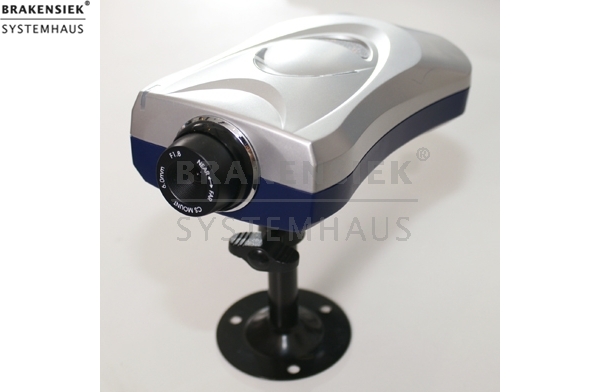
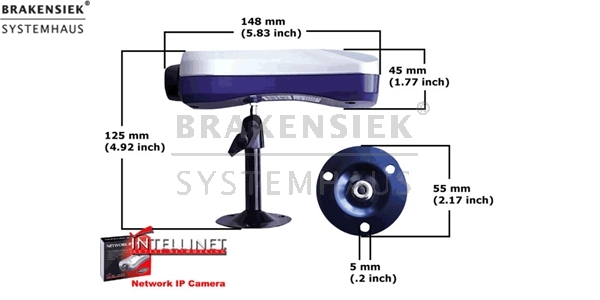
Intellinet Netzwerk IP Kamera
Intellinet Netzwerk IP Kamera
Intellinet Netzwerk IP Kamera
Warum eine Netzwerk IP-Kamera statt einer herkömmlichen WebCam?
IP-Kameras sind unabhängige Netzwerkgeräte mit integriertem Betriebssystem, auf die von jedem Computer im Netzwerk aus zugegriffen werden kann; und das von mehreren Nutzern gleichzeitig. Sie benötigen für den Betrieb keine zusätzliche Hardware und sind daher flexibel und überall im Netzwerk einsetzbar.
Eine herkömmliche WebCam wird an einen einzelnen Computer angeschlossen, kann nur von einem Anwender genutzt werden und ist nicht über das Netzwerk ansprechbar. Nur der Computer, der mit ihr verbunden ist, kann die Kamera “sehen”.
* Verbesserte Technoloie!
* Verbesserte Bildqualität, detailreicheres und schärferes Bild
* 50 % schnellere CPU für anspruchsvollere Anwendungen
* Verdoppelter interner Speicher
* Unterstützt jetzt bis zu 100 Benutzer gleichzeitig
* Integrierter DDNS Client
* Dank neuer CGI Schnittstelle verbesserte Kompatibilität zu Software von Drittanbietern
* Auch lieferbar als steuerbare Pan-Tilt-Zoom Kamera für den Außeneinsatz
Wesentliche Hauptmerkmale der Netzwerk IP Kamera
* Integriertes, neues LINUX Betriebssystem - kein separater Server
notwendig
* Bewegungsmeldung und Aufzeichnungsfunktion verbessert
* Mehrfach Log-In bis zu 100 Nutzer gleichzeitig
* FTP Upload zur Integration der Live Bilder in Webseiten
* Einfache Installation einfaches Setup in 3 Schritten
* Aufnahme von XviD komprimierten AVI Videos über den Webbrowser auf die lokale Festplatte
* Benötigt keine zusätzliche Soft- oder Hardware
* Zugriff auf die Kamera über das lokale Netzwerk oder das Internet möglich
* Benutzerabhängige Kontrolle der Bildwiederholrate
Allgemein:
• Integrierter WebServer
• Bewegungsmeldungs-Funktion mit Email
Benachrichtigung und Bildaufnahme
• 25 Bilder/Sekunde Bildwiederholfrequenz
• Gleichzeitiger Zugriff von 100 Benutzern möglich
• Anschluß zur Ansteuerung externer Geräte
• Konfigurationsmöglichkeiten für Bild-, Netzwerk und Sicherheitseinstellungen
• Passwort-geschützer Benutzerzugriff
• Integriertes Linux Betriebssystem
• Firmware Updates über Internet möglich
Netzwerk:
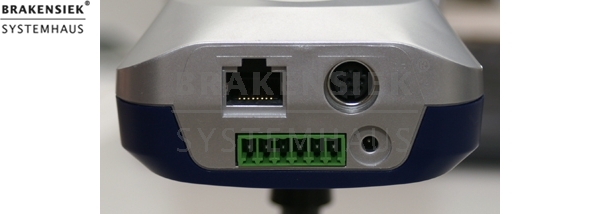
• Anschluß über Standard RJ45 Patchkabel
• Unterstützung für TCP/IP, ARP, FTP, HTTP, PING (Option) POP3, SMTP, SNMP, MIBII, Proxy Agent, BOOTP, DHCP, DNS, Telnet, etc.
System-Anforderungen:
• Windows 98, ME, NT, 2K oder XP, MacOS, Linux
• Internet Explorer 4.x, Netscape Navigator 6.x, Mozilla 1.x, Mozilla Firefox, Opera, ...
• ActiveX (MSIE) oder JAVA Runtine (alle)
Bild / Video:
• Unterstützte Auflösungen: 640 x 480, 320 x 240 und 160 x 120
• Zoran Technology Hardware JPG Codec
• 10 verschiedene Kompressionsgrade
• Video Standard: XVID (MPEG 4 Codec)
• Kompression von 80:1(hoch) bis 3:1(niedrig)
Hardware / System:
• 32 Bit RISC CPU mit Netzwerkerweiterung
• 384 KBytes Video Pufferspeicher
• 4 MByte Flash Speicher
• 8 MByte SDRAM
• 12V Netzteil im Lieferumfang enthalten
• Stromverbrauch < 5 Watt
• Ausgabe eines 12V Schalt-Signal für externe Geräte, z.B. Alarmsysteme
Objektiv / Bildsensor:
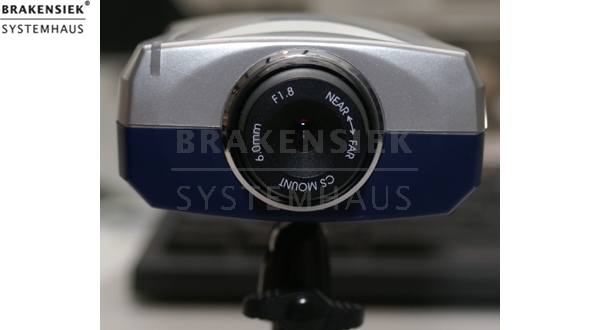
• 1/3" CMOS Objektiv, Standard CS, austauschbar
• 6.0 mm Brennweite, 54 Grad, Nahbereich 0.1m, Lichtstärke F 1.8
• 2.5 minimum Lux
• Bildsensor mit 326.668 Pixeln, 24-bit Farbtiefe, YUV Digitalausgabe
• Automatische Helligkeits- und Farbsteuerung, Gegenlicht-Kompensation
• Verschlußzeit 1/30 s ~ 1/15734 s
* Zusicherungen und Markennamen:
Die Beschreibung und die eventuelle Nennung von Markennamen dienen lediglich der allgemeinen Identifizierung der Kaufsache und stellen keine Gewährleistung oder Zusicherung im kaufrechtlichen Sinne da. Wir stellen unmissverständlich klar, dass wir kein Nutzungsrecht an den Markennamen durch den Markeninhaber eingeräumt bekommen haben. Markennamen sind rechtlich/gesetzlich geschützt und dienen hier lediglich der Produktbeschreibung. Die Angaben erheben nicht den Anspruch auf Richtigkeit und Vollständigkeit. Irrtümer und Zwischenverkauf vorbehalten. Die gemachten Angaben, die Beschreibung und die Bilder sind unverbindlich und dienen nicht als zugesicherte Eigenschaft, sofern nicht ausdrücklich erwähnt. Der Verkäufer übernimmt weder Haftung noch Gewährleistung für Tipp- und Datenübermittlungsfehler. Ausstattungen sowie Extras sind gegenenfalls gesondert bei der notwendigen ausführlichen Besichtigung des Kaufgegenstandes zu überprüfen. Änderungen und Zwischenverkauf vorbehalten. Die Artikelbeschreibung stammt von der Herstellerwebseite. Alles was in Zitatzeichen " " ist ist direkt zitiert und bzw oder ein vermuteter Markenname. Bitte kontaktieren Sie uns über das Kontaktformular, wenn Sie einen Markenrechtsverstoß bemerken. Wir werden dann unverzüglich diesen beseitigen.
Ähnliche Artikel

Panasonic BB-HCM331CE network-camera 640 x 480
Panasonic BB-HCM331CE network camera 640 x 480 Non-new Type: Outdoor with linguistic recording Picture compression: JPEG Videoresolution: 320 x 240 (default), 160 x 120 Image quality: (Favor Clarity, standard, Favor inflexion) Framerate: Max. 30 fr...

We want to buy used Mobotix Cameras
Mobotix M12D Sec DNight D43N43 new Weatherproof dual network camera with megapixel resolution and two wide-angle or telephoto lenses with a color or black-and-white sensor for use around the clock. Depending on light conditions, the camera automati...

Stromversorgung Mobotix M10
Electricity supply Mobotix M10 MX-NPA-Set-DE Suitable for all camera models Encloses the Ethernet power adaptor with RJ45 plug and the Euro-30V Mehrbereichs-net part * Zusicherungen und Markennamen: We are not authorized reseller of this b...

Mobotix Secure Flex Wandhalter
Mobotix Secure Flex wall holder Weatherproof case (IP65) of impact resistant, fiberglass-reinforced plastic (PBT-30GF), knows metallic, Manual, patch cable S. / FTP yellow 8-pole 50 cm (with magnet screen EMV), assembly key (Inbus) SecureFlex: impac...
 Unser Partner ist die