

SilverFast Ai Studio für Leica
SilverFast Ai Studio für Leica
SilverFast Ai Studio für Leica
Die zum Verkauf stehende Version unterstützt nur die folgenden Scanner-Modelle / This version only supports the following scanners:
S1 Alpha, S1 High Speed, S1 Pro
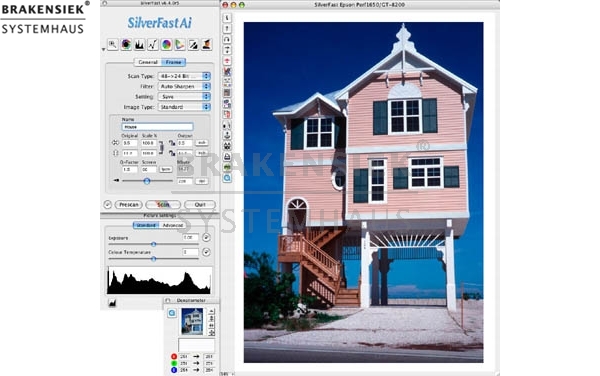
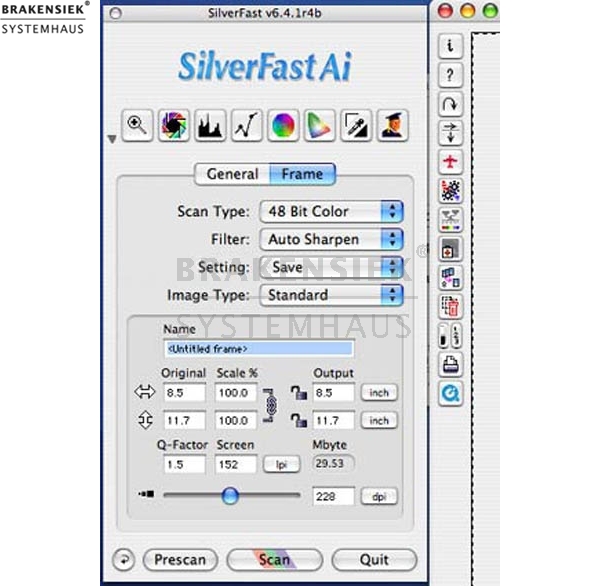
Seit Jahren ist SilverFast Ai als prämierte Imaging-Software bekannt. Leicht zu handhabende Werkzeuge für die Farbreproduktion stehen Einsteigern und Profis zur Verfügung. Durch die individuelle Anpassung an die Eigenschaften des jeweiligen Scanners ist SilverFast Ai in der Lage, das Maximum an Qualität aus jedem Gerät herauszuholen.
Die innovativen Funktionen der neuen SilverFast Ai Studio bietet ein höchstes Maß an Effizienz bei der Bildoptimierung.
Highlights
-Neu! SilverFast PrinTao - die professionelle Druckfunktion
-AACO - Autoadaptive Kontrast Optimierung
-Picture Setting Dialog
-Das Stempel-Werkzeug
-Skalierbarer Unschärfe-Maskierungs-Dialog
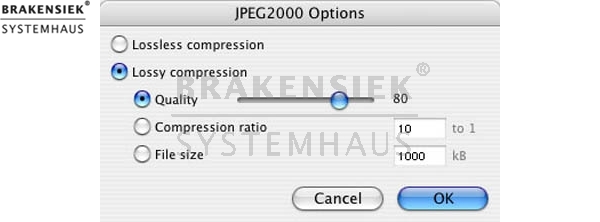
-JPEG 2000 Unterstützung (16bit-Komprimierung)
-ITPC-Daten verwenden
-Neu! Multi-Sampling
Bilder positionieren
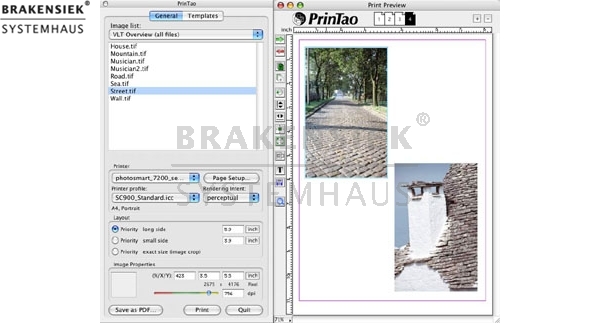
Mit PrinTao lassen sich auf einfache Art Bilder nach eigenen Wünschen zu Papier zu bringen. Neben dem Ausdruck von einzelnen Bildern können ganze Bildreihen mit individuell ausgewählten Bildern gedruckt werden. Die Positionierung auf dem Druckbogen erfolgt entweder automatisch oder manuell, ausgerichtet über Hilfslinien. Die Bilder selbst können in ihrer Größe verändert, gedreht, gespiegelt oder beschnitten werden.
Bilder lassen sich:
frei positionieren über Hilfslinien
automatisch positionieren und zentrieren
drehen und spiegeln
skalieren
beschneiden
an die Druckseitengröße anpassen
im Bildrahmen zoomen und skalieren und Bildausschnitte
können im Bildrahmen frei verschoben werden.
So ist immer eine optimale Positionierung möglich, um Papier sparend und damit kosteneffizient zu drucken.
Text hinzufügen
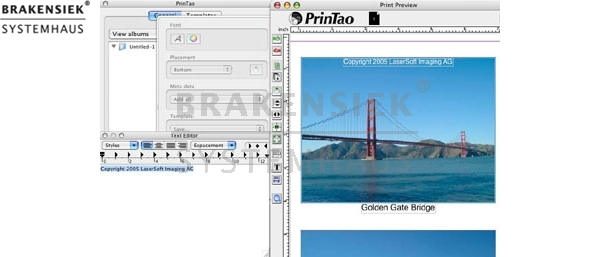
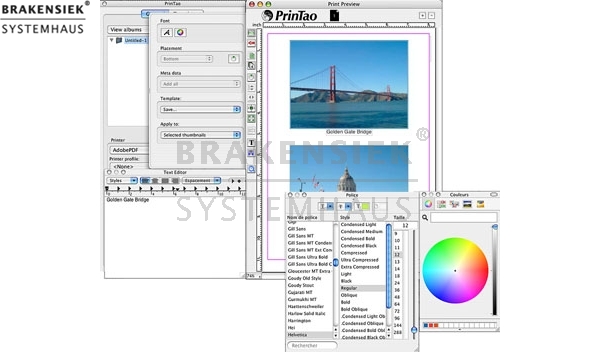
Jedem Bild lässt sich ein individueller Text zuordnen. Der Text kann dabei oberhalb, unterhalb oder seitlich neben dem Bild positioniert werden. Die Textausrichtung selbst ist linksbündig, rechtsbündig oder zentriert einstellbar.
Neben diesen Bildtexten können den Bildern Informationen aus den Meta-Daten der IPTC- und EXIF-Listen zugeordnet werden.
Zusätzlich lässt sich freier Text hinzufügen, der in seiner Schriftart, Größe, Stil, Farbe und Ausrichtung frei wählbar ist. Dies ermöglicht zum Beispiel die Gestaltung von Überschriften.
Die besondere und wichtigste Funktion ist die Eingabe eines Copyright-Textes in gewünschter Form und Größe. Mit nur einem Klick lässt sich diese wichtige Information in Sekundenbruchteilen in beliebig viele Bilder einfügen.
Druckbögen anlegen
Ein Druckjob muss nicht zwangsläufig nur aus einem Druckbogen mit Text und Bildern bestehen. In PrinTao lassen beliebig viele Seiten anlegen, die wiederum unterschiedlich gestaltet sein können. Für feine Detailarbeiten besteht sogar die Möglichkeit zu zoomen und die Druckseite vergrößert darzustellen.
Damit öffnet sich dann das weite Feld der kreativen Gestaltung.
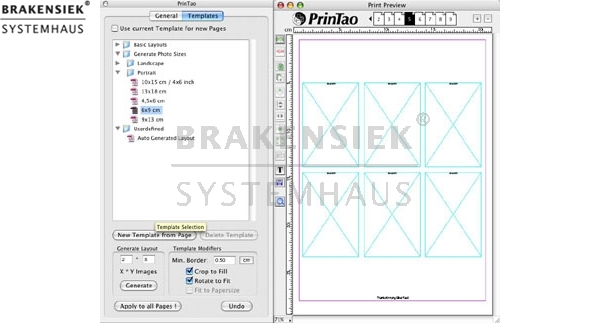
Templates erstellen
Um beim Layouten nicht immer wieder bei Null anfangen zu müssen, können in PrinTao Bilder und Textblöcke über Templates frei kombiniert werden. Dafür werden entweder vordefinierte Templates genutzt oder Templates individuell gestaltet und abgespeichert.
Vordefinierte Templates: Aus einer vorhandenen Auswahl kann ein beliebiges Template für ein oder mehrere Druckseiten ausgewählt werden. Oder die Seiten eines Druckjobs können auch mit verschiedenen Templates versehen werden. Der Bildimport erfolgt dann ganz einfach über einen Tastenklick oder Drag&Drop. Die Bilder selbst lassen sich jetzt auch wieder in ihrer Größe verändern und Bildausschnitte können gewählt werden.
Benutzerdefinierte Templates: Bei der Erstellung von individuellen Templates kann auf vorhandene Templates zurückgegriffen werden, die dann individuell angepasst und gespeichert werden. Zur freien Gestaltung eines Layouts werden Bild- und Textboxen individuell auf der Druckseite positioniert. Auch dieses Layout lässt sich wieder abspeichern und kann beim nächsten Mal wieder aufgerufen werden.
Der Template-Generator unterstützt bei der Gestaltung der Layouts, da bestimmte Parameter, wie die Anzahl der Bilder auf der Seite und deren Abstände, hier voreingestellt werden.
Bilder farbrichtig drucken
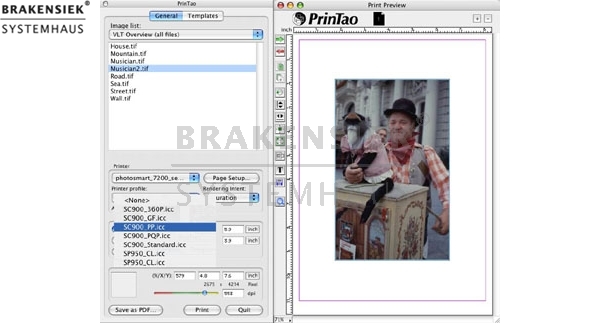
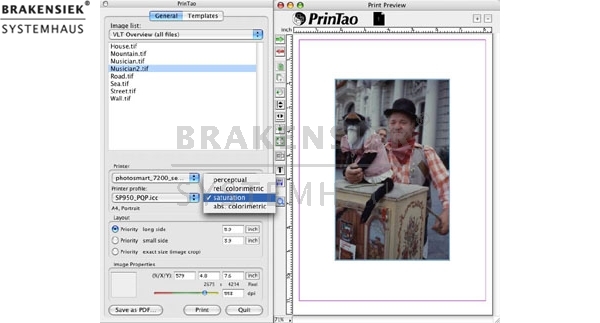
Um die Bilder zum Schluss farbrichtig zu drucken, ist es notwendig, dass das richtige ICC Profil sowie das entsprechende Rendering Intent auszuwählen. ICC Profile beschreiben die Farbräume der Ein- und Ausgabegeräte, wie Scanner, Monitor oder Drucker. Rendering Intents sind Farbumrechnungsmethoden, mit denen festgelegt wird, wie eine Umrechnung zwischen zwei über ICC Profile definierte Farbräume stattfinden soll.
PrinTao ist ab sofort standardmäßig in der SilverFast DCPro Studio und SilverFast HDR Studio enthalten.
AACO - Autoadaptive Kontrast Optimierung
SilverFast’s AACO ist ein exzellentes Werkzeug zur Korrektur von dunklen, zu kontrastreichen Bildpartien unter Beibehaltung der Zeichnung in den Lichtern. Es arbeitet automatisch sobald es aktiviert ist, kann dann aber trotzdem manuell beeinflusst werden. So sind Stärke und Umfang der aufzuhellenden dunklen Bereiche justierbar und dies sogar mit oder ohne Einfluss auf die hellen Bereiche. Beispielsweise kann in einem Bild eines verschneiten Berges mit davor liegendem sehr dunklem Tal, der Talbereich, ohne Einfluss auf die weißen Schneeflächen, aufgehellt werden.
Picture Setting Dialog
Der „Bildeinstellungen“-Dialog arbeitet in Echtzeit. Das Ausgabe-Histogramm kontrolliert sämtliche in SilverFastAi Studio vorgenommenen Einstellungen direkt in ihrer Auswirkung auf den Endscan.
Das Stempel-Werkzeug
Mit dem leistungsfähigen Stempelwerkzeug ist eine vollständige Retusche von Bildern möglich. Diese auf 16 Bit arbeitende Retuschefunktion ist eine hervorragende Ergänzung zu SilverFast SRD, der bewährten Staub- und Kratzerentfernung. Starke Defekte, tiefe Kratzer und Fehler im Bild können somit schnell und einfach entfernt oder korrigiert werden. Darüber hinaus lassen sich natürlich auch noch ganze Bildteile komplett wegretuschieren, ergänzen, umändern, etc. Damit lässt sich SilverFast nun auch für eine ganze Katalogproduktion einsetzen, ohne dass man die sonst noch notwendigen Bildbearbeitungsprogramme einsetzen muss.
Skalierbarer Unschärfe-Maskierungs-Dialog
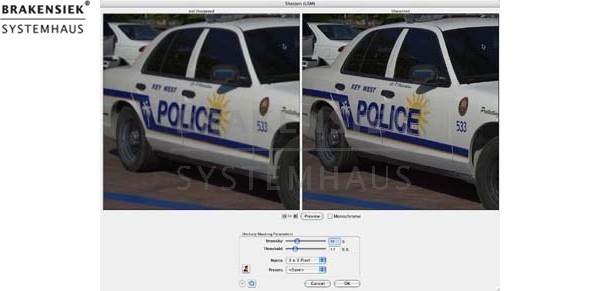
Der Unschärfe-Maskierungs-Dialog ist zusammen mit seinen Vorschaufenstern frei skalierbar und kann somit auch vergrößert werden. Dies geschieht einfach durch Klickziehen an der rechten unteren Ecke des Fensters. Damit erhält man schon vor dem Scannen einen realen Schärfeeindruck und eine deutlich bessere Bildkontrolle.
JPEG 2000 Unterstützung
Bilder lassen sich jetzt auch im Dateiformat „JPEG 2000“ (.JPF) abspeichern. Durch die Unterstützung von JPEG 2000 sind in SilverFast stärkste Kompressionen mit bis zu einer siebenfach höheren Geschwindigkeit als in anderen Programmen möglich. Zusammen mit dem SilverFast’s HiRePP-Konzept lassen sich so Dateien mit mehr als 3 GB komprimieren und schnell wieder öffnen.
SilverFasts Multi-Sampling mit Auto-Ausrichtung
Störendes Rauschen?
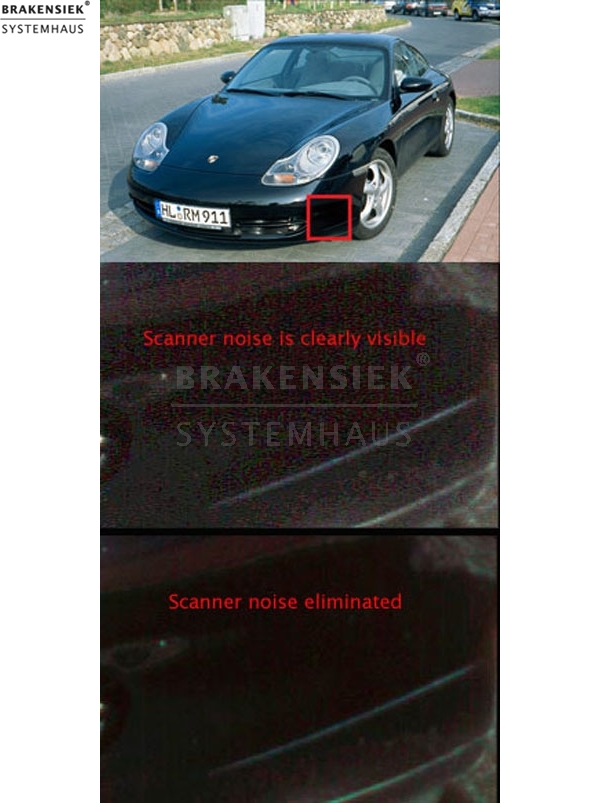
Das Scannerrauschen tritt in verschiedenen Formen auf und ist am sichtbarsten in den dunklen Bereichen. Dort wo die CCD-Elemente nur sehr wenig Licht erkennen, ist der Unterschied zwischen dem Signal des CCD-Elements und anderen Komponenten so klein, dass dieses Rauschen (verirrte Pixel) auftreten kann. Wenn so eine Vorlage nur einmal gescannt wird (normaler Scan), wird dieses Rauschen auf dem Endscan wiedergegeben. Wenn aber Multi-Sampling ausgeführt wird, tastet der Scanner die Vorlage mehrmals ab. Weil Rauschen durch zufällig auftretende, variable Pixel entsteht und SilverFast dieses erkennt, kann es so im Bild eliminiert werden.
Eine Hardware-Funktion?
Früher war Multi-Sampling nur möglich, wenn die Scanner diese Fähigkeit eingebaut hatten. Viele Scanner hatten diese Funktion aber nicht und die Anwender erhielten schlechte Ergebnisse. SilverFast hat dieses Problem jetzt gelöst und eine Multi-Sampling-Funktion integriert.
Wie funktioniert das?
Sobald die Multi-Sampling Option angewählt ist, tastet SilverFast die Vorlage während des Scanvorgangs 4, 8 oder 16 x ab. Die Anzahl der Abtastungen kann ausgewählt werden, generell gilt; je mehr Abtastungen desto bessere Ergebnisse. Nachdem alle Abtastungen miteinander verglichen worden sind, erstellt SilverFast daraus ein Endergebnis. Das Rauschen wird eliminiert, aber der Rest der Vorlage bleibt unverändert.
Das Besondere an diesem Prozess:
Da nicht jede Abtastung in derselben Position abläuft, würde eine ledigliche Eliminierung aller nicht übereinstimmenden Pixel zu einer Verzerrung des Endresultats führen. Hierfür hat LaserSoft Imaging die intelligente Auto- Ausrichtung entwickelt, die eine Verzerrung des Endscans verhindert.
Die Vorteile von SilverFast Multi-Sampling?
Mit dieser neuen Funktion können Sie Ihren Scanner zu wesentlich exakteren Ergebnissen verhelfen, in dem die Qualitäts-Stufe durch die Erhöhung der dynamischen Dichte wesentlich verbessert wird. Sie erzielen genauere Details gerade in den Schattenbereichen Ihrer Scans; selbst wenn Sie die Unsch ärfe-Maskierung benutzen, um Ihren Scan noch brillanter zu machen.
Wie wähle und stelle ich SilverFast Multi-Sampling ein?
Das SilverFast Multi-Sampling wird mittels der vertikalen Werkzeug-Leiste aktiviert. Klicken Sie auf das Multi-Sampling Icon, und wählen Sie die Anzahl der Abtastungen, die der Scanner durchführen soll. Die höchste Qualität wird durch den Faktor 16 erzielt, für durchschnittliche Ergebnisse wählen Sie bitte 4 oder 8.
Beachten Sie aber, dass die Anzahl der Abtastungen die Scanzeit direkt beeinflusst; je mehr Abtastungen desto länger die Scanzeit. Die Auflösung wird natürlich ebenfalls einen starken Einfluss auf die Scandauer haben.
Wir empfehlen, die Nutzung des JobManagers, wenn Sie mehrere Vorlagen scannen wollen, damit Sie nicht auf die Vollendung jedes einzelnen Scans warten müssen.
Multi-Sampling und High-Bit Scans?
Multi-Sampling kann bei jeder Art von Scans angewendet werden. Multi-Sampling Scans können in folgenden Modi ausgeführt werden: im 24 bit Modus, Positiv- und Negativ Modus (mittels NegaFix!), 48 bit TIFF und auch im SilverFast 48 Bit HDR Format.
Letzteres beinhaltet die gesamte dynamische Dichte des Scans und liefert bei Benutzung des Multi-Samplings die besten Ergebnisse für eine mögliche spätere Verwendung ohne Qualitätsverlust.
* Zusicherungen und Markennamen:
Die Beschreibung und die eventuelle Nennung von Markennamen dienen lediglich der allgemeinen Identifizierung der Kaufsache und stellen keine Gewährleistung oder Zusicherung im kaufrechtlichen Sinne da. Wir stellen unmissverständlich klar, dass wir kein Nutzungsrecht an den Markennamen durch den Markeninhaber eingeräumt bekommen haben. Markennamen sind rechtlich/gesetzlich geschützt und dienen hier lediglich der Produktbeschreibung. Die Angaben erheben nicht den Anspruch auf Richtigkeit und Vollständigkeit. Irrtümer und Zwischenverkauf vorbehalten. Die gemachten Angaben, die Beschreibung und die Bilder sind unverbindlich und dienen nicht als zugesicherte Eigenschaft, sofern nicht ausdrücklich erwähnt. Der Verkäufer übernimmt weder Haftung noch Gewährleistung für Tipp- und Datenübermittlungsfehler. Ausstattungen sowie Extras sind gegenenfalls gesondert bei der notwendigen ausführlichen Besichtigung des Kaufgegenstandes zu überprüfen. Änderungen und Zwischenverkauf vorbehalten. Die Artikelbeschreibung stammt von der Herstellerwebseite. Alles was in Zitatzeichen " " ist ist direkt zitiert und bzw oder ein vermuteter Markenname. Bitte kontaktieren Sie uns über das Kontaktformular, wenn Sie einen Markenrechtsverstoß bemerken. Wir werden dann unverzüglich diesen beseitigen.
Ähnliche Artikel

SilverFast Ai for Leica
SilverFast Ai for Leica This version only supports the following scanners / Die zum Verkauf stehende Version unterstützt nur die folgenden Scanner-Modelle: S1 Alpha, S1 High Speed, S1 Pro SilverFast Ai scanner software sets a new standard for ease...

SilverFast HDR Studio
SilverFast HDR Studio SilverFast HDR Studio - For those who like to be creative and productive LaserSoft Imaging is proud to present SilverFast HDR Studio. This is an enhanced version of SilverFast HDR with new features, that make the processing o...

SilverFast DCPro Studio
SilverFast DCPro Studio LaserSoft Imaging is proud to present SilverFast DCPro Studio. This is an enhanced version of SilverFast DCPro with new features, that make the processing of your digital images much more easier and convenient Highlights -...

SilverFast HDR Studio
SilverFast HDR Studio SilverFast HDR Studio - For those who like to be creative and productive LaserSoft Imaging is proud to present SilverFast HDR Studio. This is an enhanced version of SilverFast HDR with new features, that make the processing o...
 Unser Partner ist die