SilverFast ColorServer
Article number: 34219
Listed in category: Apple Intel OSX SilverFast Entry Level > SilverFast ColorServer
from brakensiek.de
SilverFast ColorServer
Automatic color conversions for more efficient workflows
Color correcting and adjusting multiple images can be time-consuming and unproductive. Flexible use of data for different purposes is a must for efficiency in today’s highly competitive market. Introducing more digital processing into the entire workflow, has driven the need for automatic data conversions from one color space to another. The manual conversion of data from one color space to a different one can become a major effort.
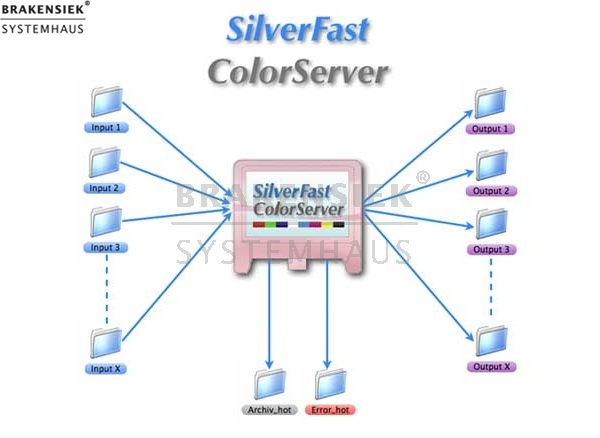
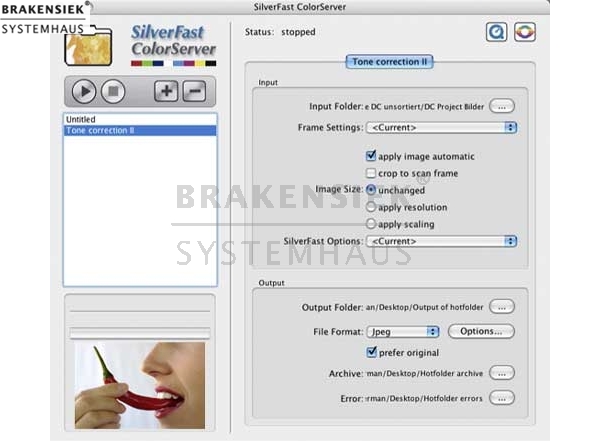
With SilverFast ColorServer, the processes of color conversion, scaling, sharpening, separation, and optimization of image data can be automatically performed via hotfolders.
High Dynamic Range conversions
One of the outstanding functions of SilverFast ColorServer is that all conversions and processing are done in the16/48 bit color space assuring maximum quality.
Incoming image data received from different sources are all treated with the same standard color management, maintaining consistent and predictable color.
Hotfolders multiply SilverFast HDR / DCPro Studio functionality
SilverFast ColorServer‘s concept was developed from the experience with SilverFast‘s successful HDR and DCPro Studio functionality. The need for an automated set of powerful functions inspired the development of the SilverFast ColorServer.
High Quality Camera Raw Conversion
SilverFast‘s DCPro Studio and HDR Studio supply a high quality RAW conversion of images for most digital SLR cameras. The conversion can be executed into linear RAW (HDR 48 bit data) or into gamma-corrected 48 or 24 bit data. Automatic image optimization and Unsharp Masking are just two of the many SilverFast high-end functions which can be easily added to the automated process.
RGB-to-CMYK conversions
RGB workflows, for scanners and digital cameras, is becoming more and more common. In reality, RGB data is often supplied as an unfinished form, requiring a resolution adjustment to the correct final size, assignment of the correct color management system, actual image optimization, and finally, sharpening, since it is dependent on the final resolution. The data is then separated into the required CMYK color space. SilverFast‘s ColorServer’s hot folder technology handles all steps automatically. RGB data placed in a hotfolder is optimized and separated in accordance with the parameters assigned to the hotfolder. This automatic process eliminates the requirement for tedious manual editing in applications such as Adobe Photoshop®, Paintshop Pro, etc.
RGB-to-RGB conversion
RGB data can be optimized with SilverFast ColorServer. In order to adjust RGB data for web applications or printing, an RGB to RGB conversion is required. SilverFast ColorServer can handle this process with its integrated color management engine in a standardized fashion using existing ICC-profiles, i.e. Adobe RGB, Apple RGB, sRGB.
Archiving HDR data with JPEG 2000 - High Dynamic Range Compression
Archiving High Dynamic Range data with the JPEG 2000 standard assures maximum compression of image data without any loss of quality. This produces faster data transfer and minimal storage requirements. JPEG 2000 also allows a compression ratio of 10:1 without any visible loss of image quality for most future applications.
Obvious cost savings through faster work processes
The hotfolder technology of the SilverFast ColorServer is user friendly and easy to use. The speed and flexibility of processing large image data (provided there is sufficient disk space) automatically results in significant cost savings.
Who needs SilverFast ColorServer?
Users who consistently process large amounts of image data, such as Real Estate Publishers, Auto/Boat Sales Magazines, Online Picture Galleries, Prepress Departments, Repro Houses, Printing Companies, Newspaper, Book Publishers, etc. will find this feature to be extremely beneficial.
Link to manual (approx. 1 MB)
Automatic color conversions for more efficient workflows
Color correcting and adjusting multiple images can be time-consuming and unproductive. Flexible use of data for different purposes is a must for efficiency in today’s highly competitive market. Introducing more digital processing into the entire workflow, has driven the need for automatic data conversions from one color space to another. The manual conversion of data from one color space to a different one can become a major effort.
With SilverFast ColorServer, the processes of color conversion, scaling, sharpening, separation, and optimization of image data can be automatically performed via hotfolders.
High Dynamic Range conversions
One of the outstanding functions of SilverFast ColorServer is that all conversions and processing are done in the16/48 bit color space assuring maximum quality.
Incoming image data received from different sources are all treated with the same standard color management, maintaining consistent and predictable color.
Hotfolders multiply SilverFast HDR / DCPro Studio functionality
SilverFast ColorServer‘s concept was developed from the experience with SilverFast‘s successful HDR and DCPro Studio functionality. The need for an automated set of powerful functions inspired the development of the SilverFast ColorServer.
High Quality Camera Raw Conversion
SilverFast‘s DCPro Studio and HDR Studio supply a high quality RAW conversion of images for most digital SLR cameras. The conversion can be executed into linear RAW (HDR 48 bit data) or into gamma-corrected 48 or 24 bit data. Automatic image optimization and Unsharp Masking are just two of the many SilverFast high-end functions which can be easily added to the automated process.
RGB-to-CMYK conversions
RGB workflows, for scanners and digital cameras, is becoming more and more common. In reality, RGB data is often supplied as an unfinished form, requiring a resolution adjustment to the correct final size, assignment of the correct color management system, actual image optimization, and finally, sharpening, since it is dependent on the final resolution. The data is then separated into the required CMYK color space. SilverFast‘s ColorServer’s hot folder technology handles all steps automatically. RGB data placed in a hotfolder is optimized and separated in accordance with the parameters assigned to the hotfolder. This automatic process eliminates the requirement for tedious manual editing in applications such as Adobe Photoshop®, Paintshop Pro, etc.
RGB-to-RGB conversion
RGB data can be optimized with SilverFast ColorServer. In order to adjust RGB data for web applications or printing, an RGB to RGB conversion is required. SilverFast ColorServer can handle this process with its integrated color management engine in a standardized fashion using existing ICC-profiles, i.e. Adobe RGB, Apple RGB, sRGB.
Archiving HDR data with JPEG 2000 - High Dynamic Range Compression
Archiving High Dynamic Range data with the JPEG 2000 standard assures maximum compression of image data without any loss of quality. This produces faster data transfer and minimal storage requirements. JPEG 2000 also allows a compression ratio of 10:1 without any visible loss of image quality for most future applications.
Obvious cost savings through faster work processes
The hotfolder technology of the SilverFast ColorServer is user friendly and easy to use. The speed and flexibility of processing large image data (provided there is sufficient disk space) automatically results in significant cost savings.
Who needs SilverFast ColorServer?
Users who consistently process large amounts of image data, such as Real Estate Publishers, Auto/Boat Sales Magazines, Online Picture Galleries, Prepress Departments, Repro Houses, Printing Companies, Newspaper, Book Publishers, etc. will find this feature to be extremely beneficial.
Link to manual (approx. 1 MB)
Contact:
Please only contact us via our registration form and only if you are a business person yourself.
We do not have an online shop. In order to avoid spam-mail, we had to introduce an established validation system.
This might be a little bit more work for you but it guarantees that we are able to supply you with an offer as quick and safe as possible.
As a basic principle, we do not make offers on the phone. As we receive more than 100 offers a day, we have up to 11 employees working making offers by mail.
To make it clear, you will not get offers generated by a system, but by our employees.
Offers for high-prized products take a little longer because they have to be approved by our managing director.
If the stoplight is red, we do not have the product on stock anymore, but we wish to purchase it.
If you fill out the registration form for this product, we will inform you as soon as the product or a similar product is available again.
Your contact person: Tim Brakensiek
Action Packs:
Here you will find our PDF product information for "SilverFast for Heidelberg Highend Scanners" and our action packs
Product information for SilverFast for Heidelberg Highend Scanners
Product overview for "SilverFast for Heidelberg Highend Scanners" from Gerhard Wolf,
Product overview for SilverFast for Heidelberg Highend Scanners
The new advantages of: SilverFast 6.5
Product information for SilverFast for Heidelberg Highend Scanners
Product overview for "SilverFast for Heidelberg Highend Scanners" from Gerhard Wolf,
Product overview for SilverFast for Heidelberg Highend Scanners
The new advantages of: SilverFast 6.5
Customers who viewed
SilverFast ColorServer
also viewed:
- Epson GT-10000+ Scanner with Silverfast Ai
- SilverFast Ai for Agfa scanners Arcus Duoscan
- SilverFast Ai for Agfa scanners Arcus Duoscan StudioStar
- SilverFast Ai for Agfa scanners SnapScan StudioScan
- SilverFast Ai for Apple scanners
- SilverFast Ai for Avision scanners AV
- SilverFast Ai for Avision scanners AV Pro
- SilverFast Ai für BenQ Scanner
- SilverFast Ai for Canon scanners
- SilverFast Ai for Crosfield scanners
- SilverFast Ai for Epson scanners
- SilverFast Ai for Epson scanner GT 10000
- SilverFast Ai for Heidelberg scanners
- SilverFast Ai for Heidelberg scanners Jade
- SilverFast Ai for Heidelberg scanners Saphir Opal
- SilverFast Ai for Howtec scanners
- SilverFast Ai for HP scanners
- SilverFast Ai for Kaiser scanners
- SilverFast Ai for Kodak scanners
- SilverFast Ai for LaCie scanners
- SilverFast Ai for Leica
- SilverFast Ai for Mediax scanners
- SilverFast Ai for Microtek scanners
- SilverFast Ai for Microtek scanners ScanMaker 4 6400XL
- SilverFast Ai for Microtek scanners ScanMaker 5 9600XL 9700XL
- SilverFast Ai for Nikon scanners
- SilverFast Ai for Pacific Image Electronics scanners
- SilverFast Ai for Plustek scanners
- SilverFast Ai for Reflecta scanners
- SilverFast Ai for SmartDisk scanners
- SilverFast Ai for Storm scanners
- SilverFast Ai for Storm scanners Scan Pro
- SilverFast Ai for Umax scanners
- SilverFast Ai for Umax scanners Powerlook 1120
- SilverFast Ai Studio for Agfa scanners
- SilverFast Ai Studio for Agfa scanners Duoscan and StudioStar
- SilverFast Ai for Agfa scanners Duoscan and StudioStar
- SilverFast Ai Studio for Agfa scanners Duoscan and StudioStar
- SilverFast Ai Studio for Avision scanners
- SilverFast Ai Studio for Avision scanners AV Pro A3
- SilverFast Ai Studio for BenQ scanners
- SilverFast Ai Studio for Canon scanners
- SilverFast Ai Studio for Crosfield scanners
- SilverFast Ai Studio for Epson scanners
- SilverFast Ai Studio for Epson scanners GT 10000
- SilverFast Ai Studio for Heidelberg scanners
- SilverFast Ai Studio for Heidelberg scanners Jade
- SilverFast Ai Studio for Heidelberg scanners Opal Saphir
- SilverFast Ai Studio for Howtek scanners
- SilverFast Ai Studio for HP scanners
- SilverFast Ai Studio for Kaiser scanners
- SilverFast Ai Studio for LaCie scanners
- SilverFast Ai Studio for Leica
- SilverFast Ai Studio for Mediax scanners
- SilverFast Ai Studio for Microtek scanners
- SilverFast Ai Studio for Microtek scanners ScanMaker 4 6400XL
- SilverFast Ai Studio for Microtek scanners ScanMaker 5 9600XL 9700XL
- SilverFast Ai Studio for Nikon scanners
- SilverFast Ai Studio for Pacific Image Electronics scanners
- SilverFast Ai Studio for Plustek scanners
- SilverFast Ai Studio for Reflecta scanners
- SilverFast Ai Studio for SmartDisk scanners
- SilverFast Ai Studio for Storm scanners
- SilverFast Ai Studio for Storm scanners Scan Pro Duo Pro II e
- SilverFast Ai Studio for Umax scanners
- SilverFast Ai Studio for Umax scanners Powerlook 1120
- SilverFast Ai und Braun Multimag SlideScan 4000
- SilverFast Ai und Epson Expression 10000XL
- SilverFast Ai und Epson Expression 1680
- SilverFast Ai und Epson Expression V750
- SilverFast Ai und Epson F-3200
- SilverFast Ai und HP ScanJet 8300
- SilverFast Ai und HP ScanJet 8300GP
- SilverFast Ai und Microtek ArtixScan 1100
- SilverFast Ai und Microtek ArtixScan 120tf
- SilverFast Ai und Microtek ArtixScan 1800f
- SilverFast Ai und Microtek ArtixScan 2020
- SilverFast Ai und Microtek ArtixScan 2500
- SilverFast Ai und Microtek ArtixScan 4000t
- SilverFast Ai und Microtek ArtixScan 4500t
- SilverFast Ai und Microtek FilmScan 1800
- SilverFast Ai und Microtek FilmScan 3600
- SilverFast Ai und Microtek ScanMaker 1000XL
- SilverFast Ai und Microtek ScanMaker 9800XL
- SilverFast Ai und Microtek ScanMaker i900
- SilverFast Ai und Plustek OpticFilm 7200
- SilverFast Ai und Plustek OpticFilm 7200i
- SilverFast Ai und Quatographic IntelliScan 5000
- SilverFast Ai und Quatographic x-finity ultra
- SilverFast Ai IT8 für Reflecta CrystalScan 7200
- SilverFast Ai und Reflecta DigitDia 4000
- SilverFast Ai und Reflecta ProScan 4000
- SilverFast ColorServer
- SilverFast DC VLT
- SilverFast DCPro
- SilverFast DCPro Studio
- SilverFast HDR
- SilverFast HDR Studio
- SilverFast SE for Agfa Scanners
- SilverFast SE for Apple Scanners
- SilverFast SE for BenQ (Acer) Scanners
- SilverFast SE for Canon Scanners
- SilverFast SE for Epson Scanners
- SilverFast SE for HP Scanners
- SilverFast SE for LaCie Scanners
- SilverFast SE for Mediax Scanners
- SilverFast SE for Microtek Scanners
- SilverFast SE for Minolta Scanners
- SilverFast SE for Pacific Image Electronics Scanners
- SilverFast SE Plus for Plustek Scanners
- SilverFast SE for Quatographic Scanners
- SilverFast SE for Reflecta Scanners
- SilverFast SE for SmartDisk Scanners
- SilverFast SE for Umax Scanners
- SilverFast SE Plus for Agfa scanners
- SilverFast SE Plus for Apple scanners
- SilverFast SE Plus for BenQ scanners
- SilverFast SE Plus for Canon scanners
- SilverFast SE Plus for Epson scanners
- SilverFast SE Plus for HP scanners
- SilverFast SE Plus for Kodak scanners
- SilverFast SE Plus for LaCie scanners
- SilverFast SE Plus for Mediax scanners
- SilverFast SE Plus for Microtek scanners
- SilverFast SE Plus for Minolta scanners
- SilverFast SE Plus for Nikon scanners
- SilverFast SE Plus for Pacific Image Electronics scanners
- SilverFast SE Plus for Plustek scanners
- SilverFast SE Plus for Quatographic scanners
- SilverFast SE Plus for Reflecta scanners
- SilverFast SE Plus for SmartDisk scanners
- SilverFast SE Plus for Umax scanners
- SilverFast SE und Canon Canoscan 8400F
- SilverFast SE und Canon Canoscan 9950F

