

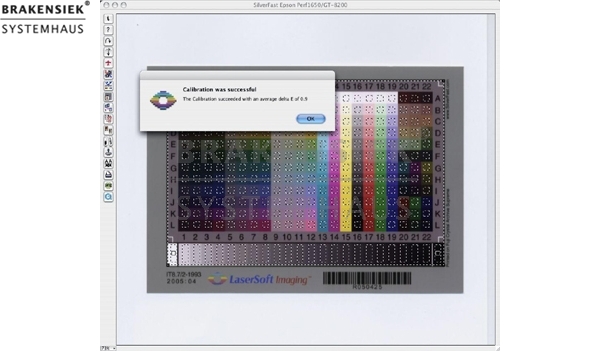
SilverFast IT8 vollautomatische Kalibration die zum Patent angemeldet ist
SilverFast IT8 vollautomatische Kalibration die zum Patent angemeldet ist
Stimmige Farben vollautomatisch: mit SilverFast IT8-Kalibration
1. Vollautomatische IT8-Kalibration
2. Professionelles Farbmanagement mit SilverFast SE Versionen
3. Test Report Scanner Multi-Exposure für CanoScan 8600F
4. SilverFast für EPSON Perfection V100/V350
5. SilverFast DC und HDR unterstützen neun neue Kamera Rohdatenformate
6. SilverFast-Scan zu Flickr
Sehr geehrter SilverFast Anwender
seit 1986 ist LaserSoft Imaging einer der Pioniere für Bildverarbeitung und Farbmanagement. In den frühen Neunzigern hat Lasersoft Imaging Leaf, Canon, Sony, Seiko und andere namhafte Hersteller bei der Integration der sich schnell entwickelnden Desktop Technologien beraten und unterstützt. Mit der neuen SilverFast Version 6.6 kombinieren wir nun unsere jahrelange Kompetenz mit optimaler Bedienbarkeit!
Stimmige Farben mit einem Mausklick: die vollautomatische IT8-Kalibration
Farbmanagement und korrekte Farbwiedergabe sind selbst für Profis eine Herausforderung“ und für den privaten Anwender eine kaum zu bewältigende Aufgabe.
Mit der neuen SilverFast-Version können sich Profis und auch private Anwendern voll und ganz auf korrekte Farben konzentrieren und die anspruchsvolle Technik dahinter vernachlässigen. Einfach indem der Scanner zunächst kalibriert wird.
Dabei ist nicht mehr als ein Maus-Klick nötig, um auch Ihren Scanner mit der neuen SilverFast Version vollautomatisiert zu kalibrieren.
Hintergrund:
Durch die Kombination der automatischen Rahmenfindung und der integrierten Barcode-Technologie in LaserSoft Imaging IT8-Targets verläuft der gesamte Kalibrierungsprozess komplett automatisch. Ein Prescan ist nicht erforderlich. Einfach das original LaserSoft Imaging-IT8-Target auf dem Scanner platzieren und den IT8-Kalibrierungsprozess starten.
Die hochwertigen IT8-Targets sowohl Auflicht- als auch Durchlicht stellt LaserSoft in seiner eigenen IT8-Produktion her. Durch kleine Losgrößen stellt der Scannersoftwarehersteller dabei höchste Präzision sicher.
Der gesamte Vorgang der vollautomatischen IT Kalibrierung ist von LaserSoft Imageing zum Patent angemeldet.
Den Workflow zur digitalen Bildbearbeitung mit einer optimalen Farbreproduktion zu beginnen, sichert maximale Farbqualität für die Ausgabe.
Die vollautomatische IT8-Kalibration ist Bestandteil aller SilverFast-Studio-Versionen. Als registrierter SilverFast-Kunde profitieren Sie von unserem Upgrade-Angebot und nutzen die vollautomatische IT8-Kalibration zu ermäßigten Konditionen.
Professionelles Farbmanagement mit SilverFast SE-Versionen
Unser Farbmanagement ist nun noch effektiver, preisgünstiger und leichter zu bedienen geworden.
Im Optionsdialog kann über CMS-Reiter zwischen standardisierten und individuell angelegten ICC-Profilen für Ihren Scanner und einen Farbraum gewählt werden“ z. B. AdobeRGB, sRGB, LStarRGB oder eciRGB.
Test Report Scanner Multi-Exposure für CanoScan 8600F
Das unabhängige Test- und Beratungsunternehmen Image Engineering Dietmar Wüller aus Frechen bei Köln bestätigt den deutlich erhöhten Dynamikbereich von SilverFast Multi-Exposure in der Kombination mit dem CanoScan 8600F.
Die Ergebnisse zeigen deutlich, wie der Dynamikumfang des CanoScan 8600F durch den Einsatz von SilverFast Multi-Exposure gesteigert und gleichzeitig das Rauschen der CCDs minimiert werden kann. Dadurch werden wesentlich mehr feine Details sichtbar, was vor allem die Qualität dunkler Bildpartien verbessert. SilverFast Multi-Exposure erzeugt 48 Bit-Rohdatenscans, in denen variable Belichtungen eingerechnet werden.
Alle SilverFast SE Plus- und SilverFast Ai Studio-Versionen ab 6.5.0r4 bieten Multi-Exposure für den CanoScan 8600F. Ob Ihr Scanner Multi-Exposure unterstützt erfahren Sie auf unserer Webseite www.silverfast.de.
SilverFast für EPSON Perfection V100/V350
Mit der neuen Version der SilverFast-Produktreihe unterstützen wir zwei neue EPSON-Scanner-Modelle: den EPSON Perfection V100 und V350.
*Für den EPSON Perfection V350 wird nur der Filmstreifen-Einzug im Moment noch nicht unterstützt.
SilverFast DC und HDR unterstützen neun neue Kamera Rohdatenformate
Mit der aktuellen Version unserer SilverFast Versionen für digitale Kameras werden neun neue Kamera Rohdatenformate unterstützt:
Nikon D2Xs
Nikon D40
Nikon D40x
Nikon D80
Fuji S5 Pro
Pentax K10D
Leica D-Lux3
Olympus SP-550UZ
Minolta Dynax 5D
SilverFast Scan zu Flickr
Wenn Sie Flickr als Ihre beliebteste Online-Fotoplattform verwenden und SilverFast, dann gibt es einen großartigen Weg, die Bilder Ihrer analogen Fotografie direkt auf Ihre Flickr Fotoseite hochzuladen.
Dies ist ein sehr leichte Methode und kann sowohl mit SilverFast SE und Ai in allen Versionen angewandt werden.
* Zusicherungen und Markennamen:
Die Beschreibung und die eventuelle Nennung von Markennamen dienen lediglich der allgemeinen Identifizierung der Kaufsache und stellen keine Gewährleistung oder Zusicherung im kaufrechtlichen Sinne da. Wir stellen unmissverständlich klar, dass wir kein Nutzungsrecht an den Markennamen durch den Markeninhaber eingeräumt bekommen haben. Markennamen sind rechtlich/gesetzlich geschützt und dienen hier lediglich der Produktbeschreibung. Die Angaben erheben nicht den Anspruch auf Richtigkeit und Vollständigkeit. Irrtümer und Zwischenverkauf vorbehalten. Die gemachten Angaben, die Beschreibung und die Bilder sind unverbindlich und dienen nicht als zugesicherte Eigenschaft, sofern nicht ausdrücklich erwähnt. Der Verkäufer übernimmt weder Haftung noch Gewährleistung für Tipp- und Datenübermittlungsfehler. Ausstattungen sowie Extras sind gegenenfalls gesondert bei der notwendigen ausführlichen Besichtigung des Kaufgegenstandes zu überprüfen. Änderungen und Zwischenverkauf vorbehalten. Die Artikelbeschreibung stammt von der Herstellerwebseite. Alles was in Zitatzeichen " " ist ist direkt zitiert und bzw oder ein vermuteter Markenname. Bitte kontaktieren Sie uns über das Kontaktformular, wenn Sie einen Markenrechtsverstoß bemerken. Wir werden dann unverzüglich diesen beseitigen.
Ähnliche Artikel

SilverFast Ai STUDIO IT8 Heidelberg TANGO + SilverFast HDR STUDIO
SilverFast TANGO Ai IT8 Studio Heidelberg TANGO + HDR Studio For Mac OS X or Windows Inclusive hand measured IT8-Target for transparency and reflective Inclusive Auto-IT8 calibration Demodownloadlink: http://www.silverfast.de/get_demo/de.html?pro...

SilverFast Ai STUDIO IT8 Heidelberg Nexscan F4100 + SilverFast HDR STUDIO
SilverFast Nexscan Ai IT8 Studio Heidelberg Nexscan + HDR Studio + Bundle Ratoc SCSI FireWire Converter Nicht Neu (refurbished) Demodownloadlink: http://www.silverfast.de/get_demo/de.html?productline=highend&vendor=Heidelberg For Mac OS X or Windo...

SilverFast Ai STUDIO IT8 Heidelberg Nexscan F4200 + SilverFast HDR STUDIO
SilverFast Nexscan Ai IT8 Studio Heidelberg Nexscan + HDR Studio + Premium Support Demodownloadlink: http://www.silverfast.de/get_demo/de.html?productline=highend&vendor=Heidelberg For Mac OS X or Windows The Nexscan software package contains Ai S...

SilverFast Ai STUDIO IT8 Heidelberg Chromagraph S3300 + SilverFast HDR STUDIO
SilverFast Ai STUDIO IT8 Heidelberg CHROMAGRAPH S3300 + SilverFast HDR STUDIO For Mac OS X or Windows Inclusive IT8 Calibration with hand measured target for transparency and reflective Demodownloadlink: http://www.silverfast.de/get_demo/de.html?...
 Unser Partner ist die