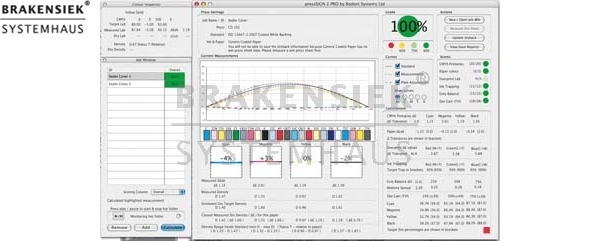
pressSIGN-Pro automatic color control on press
Article number: 36502
Listed in category: Prepress Software > pressSIGN-Pro automatic color control on press
from brakensiek.de
pressSIGN-pro. Automated color accuracy on press.
pressSIGN-pro automatically imports CGATS data from a number of auto-scanning devices like X-Rite's Intellitrax S, Heidelberg's ImageControl and Komori's PDCS, and shows the operator how to adjust density and the plate curve to meet the desired target.
pressSIGN-Pro is the most effective tool for matching any printing standard. Print to any international standard or create your own standard :-
- ISO 12647-2 sheet-fed or web offset
- ISO 12647-3 newsprint
- ISO 12647-4 gravure
- ISO 12647-6 flexographic
- Create your own standard by measuring an individual or set of press sheets (average these measurements).
- Import an ICC profile and make this your new standard
- Key in the target values to create a new standard
pressSIGN - Five easy steps to accurate colour
- use the pressSIGN control strip in place of your standard color bar
- read the color bar with your auto-scanning device and adjust the densities as suggested by pressSIGN
- read the control strip when dry and update the dry back calculations
- adjust the plate curve as recommended by pressSIGN
- run the next job with the pressSIGN settings and you'll have consistently accurate colour
More about pressSIGN-Pro
- test for ISO 12647-2, 12647-3, GARCol G7 & SWOP compatibility
- receive detailed pdf reports and label print output
- traffic light scoring system
- average readings from one or more jobs to get an overall score.
- compare print quality throughout the run
- generate your own standards based on previous jobs or typing in your own values.
pressSIGN-PrintBuyer meets all your measurement needs
- CIE L*a*b* values for CMYK & spot colours
- Density values for CMYK & spot colours
- Dot Gain (Tonal Value Increase - TVI) for CMYK & spot colours
- Grey Balance
- Overprint values
- Ink Trapping
- Paper Colour
Choose the correct standard
Select different international printing standards according to the type of press, the type of paper and the appropriate dot gain curve. Make sure your job is printed according to your needs.
pressSIGN-Pro also allows you to set your own standards. You can set your own standard based on measurements or by typing in target values for the primaries and dot gain etc. Setting your own standard based on measurements is easy. Just measure one or more sheets which can then be averaged or import data from another user or previous job(s) and save this as your new standard. Export this standard to your printer and he can then print to your exact settings.
pressSIGN-Pro version gives printers a step by step guide to accurate printing
pressSIGN-Pro enables printers to reach the required standard quickly and easily
pressSIGN-Pro reads spectral information from the sheet and suggests the correct density adjustment, making it easy for the printer to get to the right settings quickly.
Setting the right dot gain curve can be difficult. pressSIGN-Pro provides the tools to set the correct dot gain curve quickly and easily.
Complete set of measurements in seconds
When you have read the color bar you'll receive an instant report on all aspects of the press sheet. The speed of operation makes it easy to read and check all your print jobs. You can output this report as a pdf or a simple label you can attach to the print job.
pressSIGN-Pro also works in conjunction with the GretagMacbeth Eye-One Pro spectrophotometer and allows individual patches to be measured.
You can make individual measurements from anywhere on the press sheet. You may want to compare values for consistency or even compare spot colours against a Pantone guide or a value you have taken from Adobe's Photoshop. You can test for Lab values, density values and dot area.
pressSIGN turns the Eye-One into complete press measurement tool.
Measure the Lab value, density and dot area and compare it with other readings either from the press sheet or your Pantone book, or the proof . Set pressSIGN to check the DeltaE or Dot Area of the CMYK primaries or compare the Lab values/Dot area of secondary colours or spot colours. You can even type in a Lab value, which you might have taken from Adobe PhotoShop, and compare this with the colour on the press sheet.
Automatically save all readings to a folder.
Import previous readings form one or more jobs. This allows you to average plate curves from different presses, so reducing the number of plate queues required.
Average the readings.
Sort the readings according any of the criteria measured. For example, select only the measurements that have a 100% pass for the primaries in order to only use this data to create the dot gain information to export to the RIP.
Create a standard based on one or more readings. This feature allows you to print a job which is outside any international standard, measure the results and make this measurement the basis for your own standard.
Create your own standard by keying in the values you require. Input the Lab values for the primaries, dot gain and other criteria based on your specific needs.
pressSIGN-pro automatically imports CGATS data from a number of auto-scanning devices like X-Rite's Intellitrax S, Heidelberg's ImageControl and Komori's PDCS, and shows the operator how to adjust density and the plate curve to meet the desired target.
pressSIGN-Pro is the most effective tool for matching any printing standard. Print to any international standard or create your own standard :-
- ISO 12647-2 sheet-fed or web offset
- ISO 12647-3 newsprint
- ISO 12647-4 gravure
- ISO 12647-6 flexographic
- Create your own standard by measuring an individual or set of press sheets (average these measurements).
- Import an ICC profile and make this your new standard
- Key in the target values to create a new standard
pressSIGN - Five easy steps to accurate colour
- use the pressSIGN control strip in place of your standard color bar
- read the color bar with your auto-scanning device and adjust the densities as suggested by pressSIGN
- read the control strip when dry and update the dry back calculations
- adjust the plate curve as recommended by pressSIGN
- run the next job with the pressSIGN settings and you'll have consistently accurate colour
More about pressSIGN-Pro
- test for ISO 12647-2, 12647-3, GARCol G7 & SWOP compatibility
- receive detailed pdf reports and label print output
- traffic light scoring system
- average readings from one or more jobs to get an overall score.
- compare print quality throughout the run
- generate your own standards based on previous jobs or typing in your own values.
pressSIGN-PrintBuyer meets all your measurement needs
- CIE L*a*b* values for CMYK & spot colours
- Density values for CMYK & spot colours
- Dot Gain (Tonal Value Increase - TVI) for CMYK & spot colours
- Grey Balance
- Overprint values
- Ink Trapping
- Paper Colour
Choose the correct standard
Select different international printing standards according to the type of press, the type of paper and the appropriate dot gain curve. Make sure your job is printed according to your needs.
pressSIGN-Pro also allows you to set your own standards. You can set your own standard based on measurements or by typing in target values for the primaries and dot gain etc. Setting your own standard based on measurements is easy. Just measure one or more sheets which can then be averaged or import data from another user or previous job(s) and save this as your new standard. Export this standard to your printer and he can then print to your exact settings.
pressSIGN-Pro version gives printers a step by step guide to accurate printing
pressSIGN-Pro enables printers to reach the required standard quickly and easily
pressSIGN-Pro reads spectral information from the sheet and suggests the correct density adjustment, making it easy for the printer to get to the right settings quickly.
Setting the right dot gain curve can be difficult. pressSIGN-Pro provides the tools to set the correct dot gain curve quickly and easily.
Complete set of measurements in seconds
When you have read the color bar you'll receive an instant report on all aspects of the press sheet. The speed of operation makes it easy to read and check all your print jobs. You can output this report as a pdf or a simple label you can attach to the print job.
pressSIGN-Pro also works in conjunction with the GretagMacbeth Eye-One Pro spectrophotometer and allows individual patches to be measured.
You can make individual measurements from anywhere on the press sheet. You may want to compare values for consistency or even compare spot colours against a Pantone guide or a value you have taken from Adobe's Photoshop. You can test for Lab values, density values and dot area.
pressSIGN turns the Eye-One into complete press measurement tool.
Measure the Lab value, density and dot area and compare it with other readings either from the press sheet or your Pantone book, or the proof . Set pressSIGN to check the DeltaE or Dot Area of the CMYK primaries or compare the Lab values/Dot area of secondary colours or spot colours. You can even type in a Lab value, which you might have taken from Adobe PhotoShop, and compare this with the colour on the press sheet.
Automatically save all readings to a folder.
Import previous readings form one or more jobs. This allows you to average plate curves from different presses, so reducing the number of plate queues required.
Average the readings.
Sort the readings according any of the criteria measured. For example, select only the measurements that have a 100% pass for the primaries in order to only use this data to create the dot gain information to export to the RIP.
Create a standard based on one or more readings. This feature allows you to print a job which is outside any international standard, measure the results and make this measurement the basis for your own standard.
Create your own standard by keying in the values you require. Input the Lab values for the primaries, dot gain and other criteria based on your specific needs.
Contact:
Please only contact us via our registration form and only if you are a business person yourself.
We do not have an online shop. In order to avoid spam-mail, we had to introduce an established validation system.
This might be a little bit more work for you but it guarantees that we are able to supply you with an offer as quick and safe as possible.
As a basic principle, we do not make offers on the phone. As we receive more than 100 offers a day, we have up to 11 employees working making offers by mail.
To make it clear, you will not get offers generated by a system, but by our employees.
Offers for high-prized products take a little longer because they have to be approved by our managing director.
If the stoplight is red, we do not have the product on stock anymore, but we wish to purchase it.
If you fill out the registration form for this product, we will inform you as soon as the product or a similar product is available again.
Your contact person: Tim Brakensiek
Action Packs:
Here you will find our PDF product information for "SilverFast for Heidelberg Highend Scanners" and our action packs
Product information for SilverFast for Heidelberg Highend Scanners
Product overview for "SilverFast for Heidelberg Highend Scanners" from Gerhard Wolf,
Product overview for SilverFast for Heidelberg Highend Scanners
The new advantages of: SilverFast 6.5
Product information for SilverFast for Heidelberg Highend Scanners
Product overview for "SilverFast for Heidelberg Highend Scanners" from Gerhard Wolf,
Product overview for SilverFast for Heidelberg Highend Scanners
The new advantages of: SilverFast 6.5
Customers who viewed
pressSIGN-Pro automatic color control on press
also viewed:
- Apple Mac OS X 10 4 Tiger
- Filemaker 9 Server
- Hermstedt Grand Central Pro Software Mac
- PosterJet 8 e60+ PS Vollversion aus Update
- 4-SightFax
- ACDSee PowerPack 7
- ACDSee Pro
- Acronis True Image 9.1 Server für Windows
- Acronis TrueImage 11 Home
- Adobe Acrobat
- Adobe Acrobat 6.0
- Adobe Acrobat 8 Professional
- Adobe Creative Suite Prem.
- Adobe CS3 Design Premium Vollversion aus Upgrade Mac
- Adobe CS3 Design Premium Vollversion aus Upgrade Win
- Adobe CS3 Suite Design Premium Upgrade Mac
- Adobe CS3 Suite Design Premium Upgrade Win
- Adobe CS3 Suite Design Premium Vollversion aus Upgrade Win
- Adobe CS3 Suite Design Premium Vollversion Mac
- Adobe CS3 Suite Design Premium Vollversion Win
- Adobe CS3.3 Suite Design Premium Upgrade Mac von CS3
- Adobe CS4 Design Prem dt. Mac Upgrade (CS Prem/Std,Stud)
- Adobe CS4 Design Prem dt. Mac Upgrade (CS3.x)
- Adobe CS4 Design Prem dt. Mac Upgrade (Grp)
- Adobe CS4 Design Prem dt. Win Upgrade (CS Prem/Std,Stud)
- Adobe CS4 Design Prem dt. Win Upgrade (CS3.x)
- Adobe CS4 Design Prem dt. Win Upgrade (Grp)
- Adobe CS4 Design Premium dt. Mac
- Adobe CS4 Design Premium dt. Win
- Adobe Font Folio v11 dt. Mac/Win 5 User
- Adobe FreeHand 11 Vollv CD D MAC
- Adobe Photoshop CS3 Mac
- Adobe Photoshop Extended CS3 Mac
- Adobe Photoshop Extended CS3 Windows
- Adobe Photoshop Lightroom
- Adobe Type Collection OpenType Edition
- Adobe Upgrade Photoshop CS3 Mac
- Adobe Upgrade Photoshop CS3 Windows
- Adobe Upgrade Photoshop Extended CS3 Mac
- Adobe Upgrade Photoshop Extended CS3 Windows
- Advent 3B2 Dongle V7.x
- AGFA Apogee IRT V1_2 Win
- Alsoft DiskWarrior f. Mac
- Apple Mac OS X 10.4 Tiger
- AppleCare Protection Plan TechTool Deluxe CD
- ArchiCAD 6.5R4
- Assorted Collection 1.0 OpenType
- AVM Ken! 4
- BEST Colorproof Laser mit USB-Dongle
- 3M Cactus V4.2.6 Suite Xerox 8954 III (200dpi, 300dpi, 400dpi) Elektrostaten RIP MacOS mit 2 PCI PowerMac Interfaces und 5 Dongles
- CGS ORIS Normalizer (ehem. Works)
- CGS ORIS PDF-Tuner
- Compose GapFinder
- CorelDRAW Graphics Suite 12
- Crackerjack
- Craydon Administrator, deutsch/englisch
- Creo Preps 5.1 Plus Standard
- Creo Preps 5.1 Plus Standard - Upgrade von 4.x
- Crystal Reports Server XI
- D2P Monitor & D2P Referenz profile MAC
- DALiM DiALOGUE
- DALiM LiTHO
- DALiM MiSTRAL
- DALiM PRiNTEMPO
- DALiM SWiNG
- DALiM TWiST
- DI-Plot
- Distiller Secrets
- EFI best Premium Suite Option 5.01 f. Windows, EFI Best Premium Options + Remote Proof
- EFI Best Colorproof XXL Version 5.0.1
- EFI best premium Suite option 5.01 f. Windows, best premium options + remote proof
- EFI Best Premium Suite Option 5.01 f. Windows, best premium options + remote proof
- EFI Best Remote Proof
- Enfocus CheckUp 1_5 Mac OS
- Enfocus PitStop Professional 7.5
- Estos ProCall 2.2
- ComputerAssociates eTrust AntiVirus 7.0
- Extensis Suitcase 10
- Extensis Suitcase X1
- Extensis Suitcase X1, Zeichensatzverwaltungslösung f. MacOS X
- ExtremeZ-IP 5.3
- FileMaker 7 Pro
- Filemaker 8 Advanced
- Filemaker 8 Mobile
- FileMaker Pro 8
- FileMaker Pro 8
- Filemaker Pro 9
- Filemaker Pro 9 Advanced
- Filemaker Pro 9 Advanced Upgrade
- Filemaker Pro 9 Upgrade
- Filemaker Server 8
- Filemaker Server 8 Advanced
- Filemaker Server 9 Upgrade
- Filemaker Pro 5-9 WIBU-Key Dongle Kopierschutz
- FontAgent Pro 1.2 Mac OSX Client for Server
- FontAgent Pro 1.2 Mac OSX Server
- FontAgent Pro 3.3 Mac OSX
- FontAgent Pro 3.3 Mac OSX Workgroup Edition
- Fotoslate 4
- gotomaxx maxx Archiv Mail & Print Business Edition
- gotomaxx maxx Archiv Mail & Print Business Edition WIN
- gotomaxx maxx Archiv Mail & Print Business Edition Windows
- Gretag Macbeth ProfileMaker 4.1
- Harlequin HQ RIP 7.1
- Heidelberg NewColor 7000 OSX
- Helios EtherShare
- Helios EtherShare OPI
- Helios PCShare
- TIFF/ITflow
- Farukh Imposition Publisher PDF PS
- InkMonitor Pro
- IntelliPDF Curves
- ITC Collection 1.0 OpenType
- ITC Library OpenType Edition
- KERIO MailServer
- Kodak Preps 5.31 PLUS für Windows und Mac mit USB I-Key Dongle
- Linotype GoldEdition™ 1.7.1 Font-Kollektion
- Linotype Library für MacOS
- Linotype OpenType Library 1.0 Bundle
- Mac OS X 10.5 Leopard
- Mac OS X Server v10.4
- Macromedia FreeHand 11 dt. Win Upgrade (v9)
- Macromedia Freehand MX Mac
- Macromedia Freehand MX Windows
- MarkzTools 5
- Markzware MarkzTools 7 int. Mac
- maxx Archiv mail & print - Buisness Edition
- maxx Archiv mail & print - Server
- Microsoft Office 2004 Mac
- Microsoft Virtual PC 7 WinXP Pro dt. Mac
- Microsoft Windows 2000 Client License Pak
- Microsoft Windows Small Business Server 2003 Standard Edition
- Monotype Library OpenType Edition
- OmniPage Professional 16
- CGS Oris Works 4.2/Oris PDF Tuner 4.2
- Oris Works
- CGS Oris Works 4.4 /Oris ODF Tuner 4.4 Dongle
- Parallels Desktop 3.0 for Mac UPGRADE
- Parallels Desktop for Mac
- Parallels Server für Mac 3.0
- PDFlib 7
- PDFlib Lite
- PDFlib pCOS
- PDFlib PDI
- PDFlib Personalization Server PPS
- PDFlib PLOP
- PDFlib TET
- PosterJet Version 7.0 Small Business Edition Windows
- PrePage-it Workflow Software für Harlequin RIPs
- Scenicsoft Preps Plus 4.22
- pressSIGN v 2 - press measurement & verification software
- pressSIGN-PrintBuyer & proofSIGN software bundle
- pressSIGN-PrintBuyer v 2
- pressSIGN-PrintBuyer-suite
- pressSIGN-Pro automatic color control on press
- pressSIGN-suite - complete colour verification package
- Heidelberg Prinect Signa 1.5 102 Pro + Packaging + CIP3 Cutting
- Gretag ProfileMaker 5.05 Publish Pro
- Gretag ProfileMaker ICC Colormanagement Profilierung
- proofSIGN - fast & easy proof verification
- proofSIGN - fast & easy proof verification inc. Gretag Eye-One Design
- proofSIGN - fast & easy proof verification inc. Gretag Eye-One Proof
- Quark Interactive Designer
- Quark Print Collection
- Quark XPress 6.5 (Mac)
- Quark XPress 6.5
- Quark XPress 6.5 (Mac)
- Quark XPress 6.5 (Windows)
- Quark XPress 6.5 Multiling Mac Upgrade
- Quark XPress 7 for Intel-based Macs
- Quark XPress 7 für Mac
- Quark XPress 7 Love Bundle Vollversion aus Upgrade
- QuarkXPress 7 Passport
- QuarkXPress 6.5
- QuarkXPress 8
- QuarkXPress Server 7
- RagTime 6 Benutzererweiterung 2 bis 4
- RagTime 6 Benutzererweiterung 5+
- RagTime 6 Handbuchsatz komplett
- RagTime 6 L für 15 User
- RagTime 6 M für 5 User
- RagTime 6 S Einzelplatz
- RagTime 6 Upgrade Einzelplatz
- RagTime 6 Upgrade Einzelplatz Version 1-3
- RagTime 6 Upgrade Mehrfachlizenz
- RagTime 6 XL Firmenlizenz
- RagTime Connect Pro
- EMC/Dantz ESD Retrospect Disaster Recovery 7.5 dt. Win
- EMC Dantz Retrospect Multi Server Vers. 7 mit Update auf Version 7.5 (EMC Insignia)
- EMC Dantz Retrospect Server BackUp 6.0 OSX
- Roxio Toast 7.0 Titanium, Vollversion, CD, deutsch/englisch/franz., MAC OS10
- Heidelberg DaVinci
- TakeType 4 Value Pack
- TakeType™ 4 CD für Mac OS und Windows
- TakeType Collection 1.0 OpenType
- TakeType™ 5 OpenType CD für Mac OS und Windows
- TakeType™ 5 Value-Pack
- TakeType™ 3.1 CD für Mac OS und Windows
- TakeType™ No. 3.1Value-Pack
- TAO Solutions TAPI2FMP Plugin
- TIFFPager
- Tobit David Home
- Torrent RIP für EPSON 9000
- VMware Fusion
- Windows 2003 Server
- Windows Server Standard 2003 1-4CPU 5Clt OEM
- Windows Svr Std 2003 1-4CPU 5Clt OEM
- WinOnnMac: Ready to Run Boot Parallels Kit: